How to Colorize Webtoons & Manga: A Creator's Guide
Everything manga and webtoon creators need to know about adding color to black-and-white panels — from preparation and palette selection through AI colorization, touch-ups, and final publishing.
 Watashi Games|
Why Creators Are Adding Color to Webtoons
The webtoon market is more competitive than ever. Platforms like Webtoon, Tapas, and Tappytoon feature thousands of series competing for reader attention, and color has become the default expectation. Readers scroll past black and white thumbnails in favor of vibrant colored covers, and platform algorithms tend to promote content with higher engagement — which colored webtoons consistently achieve.
For creators who draw in black and white — whether by preference, tradition, or time constraints — colorization used to mean hiring a colorist or spending hours in Photoshop per panel. AI colorization has fundamentally changed that equation. A full vertical webtoon strip can now be colorized in under a minute, with results that rival manual colorization for most art styles.
This guide is written for webtoon creators who want to add color to their workflow without sacrificing speed or creative control. We will walk through every step from panel preparation to publishing, with practical tips drawn from creators who have shipped hundreds of colored episodes using AI tools like Watashi Colorizer, built by Watashi Games (watashigames.com).
Preparing Your Panels for Colorization
The quality of your colorized output depends heavily on the quality of your input. AI colorization models work best with clean line art — strong, consistent lines with clear boundaries between areas. If your art has a lot of crosshatching, heavy screentone, or very thin lines, the AI may struggle to identify boundaries and produce muddy results.
Before uploading panels for colorization, clean up any scanning artifacts if you work traditionally. Remove dust spots, straighten skewed scans, and ensure your blacks are solid black and whites are clean white. For digital artists, flatten your layers and export at your working resolution — the AI handles the rest. Avoid adding screentones before colorization since they can confuse the color placement.
For webtoon-format strips, you do not need to slice your panels into individual images. Watashi Colorizer's webtoon mode automatically detects panel dividers in tall vertical strips, splits the image at optimal points, colorizes each segment with awareness of neighboring panels, and reassembles everything into the original strip format. Just upload your full strip as-is.
Choosing Your Color Palette
Color palette selection is one of the most impactful decisions in webtoon colorization. A well-chosen palette can transform the mood of your entire series — warm, saturated palettes feel energetic and youthful, while muted, desaturated palettes convey maturity or melancholy. Before colorizing your first episode, spend time defining the overall color direction for your series.
Character palettes are separate from your general color direction. In Watashi Colorizer, you define each character's specific colors — hair color, eye color, skin tone, and typical outfit colors. The AI uses these definitions as hard constraints, ensuring your protagonist always has the same blue hair and red jacket regardless of the scene. This is especially important for long-running series where consistency across dozens of episodes builds reader trust.
Environment colors benefit from context learning. After colorizing a few episodes, the AI begins to associate recurring settings with specific palettes — your character's bedroom gets the same warm lighting each time, the school hallway maintains its cool fluorescent tone. You can also provide explicit environment descriptions to guide the AI before it has learned your settings.
B&W
Color
The AI Colorization Workflow
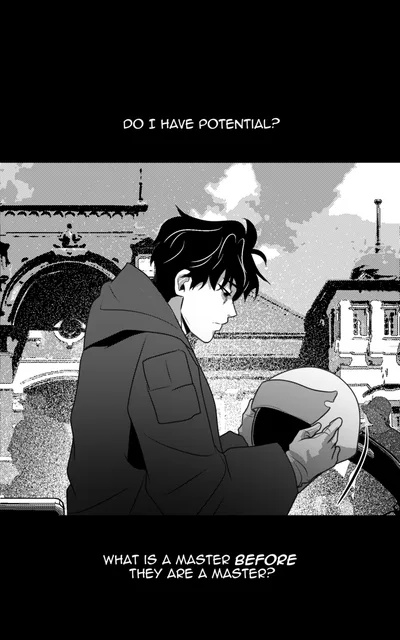
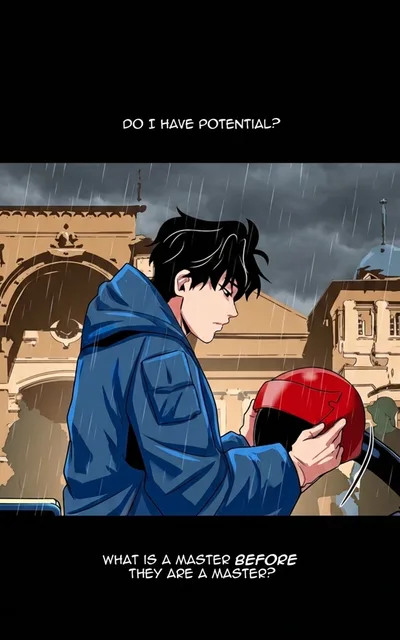
The typical AI colorization workflow for webtoon creators involves four steps: upload, configure, colorize, and review. First, upload your black and white strips to a project in Watashi Colorizer. You can upload an entire episode's worth of strips at once — the batch processing system handles them all in parallel.
Configuration is where you set your character palette, choose your colorization intensity, and optionally provide scene context. For most creators, the default settings with a well-defined character palette produce excellent results. Power users can add per-image instructions for specific scenes — "sunset lighting," "underwater blue tint," or "flashback sepia tone" — to override the default color behavior.
Once you hit colorize, the AI processes your strips in smart batches. It groups consecutive panels together so that a scene spanning three strips maintains color continuity across all of them. Processing time depends on the number of strips and their complexity, but a typical 30-panel episode completes in two to four minutes. For creators who publish on Watashi Marketing, the colored outputs can feed directly into social media promotion workflows. Learn how we marketed Watashi Colorizer with zero ad spend in our AI tools marketing guide.
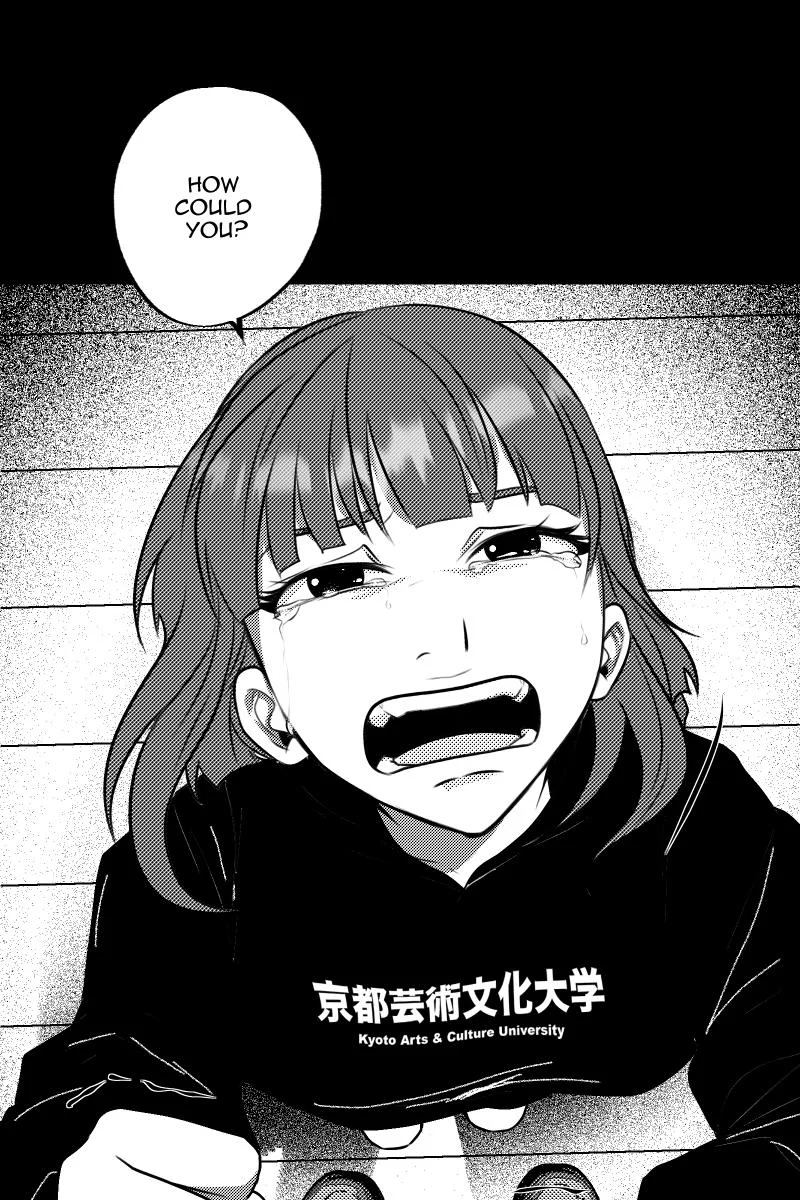
B&W
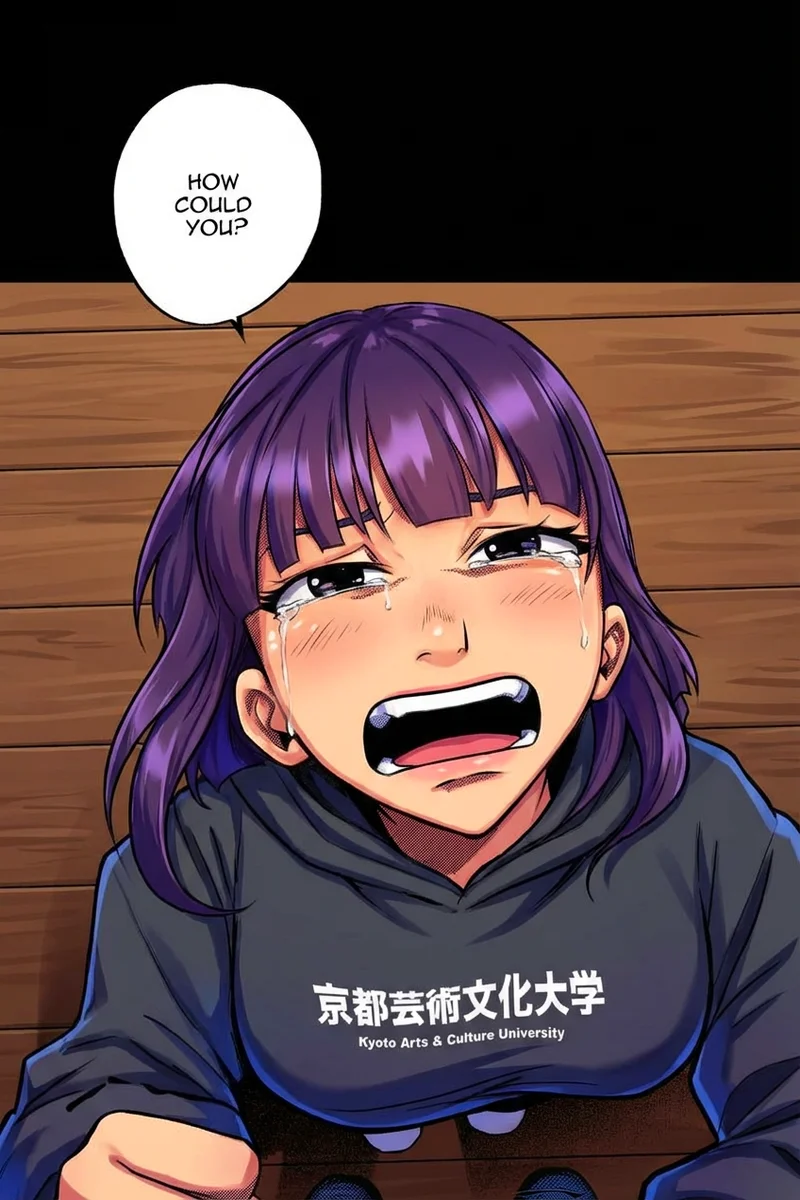
Color
Manual Touch-Ups and Refinements
Even the best AI colorization occasionally needs human refinement. The most common issues are color bleeding at complex line intersections, incorrect color assignment for ambiguous areas (like a character wearing a new outfit the AI has not seen), and mood mismatches where the AI chose bright colors for a somber scene.
Watashi Colorizer includes an edit mode where you can provide natural-language corrections to any panel. Instead of manually painting over areas in Photoshop, you describe the change — "make the sky darker and more purple" or "change the character's shirt from blue to green" — and the AI re-renders that specific area. This iterative approach is dramatically faster than manual editing and preserves the AI's rendering style.
For creators who want pixel-level control, you can always download the colored output and refine specific areas in your preferred editing tool. Many creators adopt a hybrid approach: AI colorization for 90-95% of the work, followed by quick manual touch-ups on the 5-10% of panels that need special attention. This combination delivers professional-quality colored webtoons in a fraction of the time that full manual colorization would require.
Publishing Your Colored Webtoons
Once your colored episodes are ready, the final step is preparing them for your target platform. Different webtoon platforms have different requirements for image dimensions, file size limits, and format preferences. Watashi Colorizer outputs high-resolution images that work directly with major platforms, and the built-in upscaling feature can boost resolution for platforms that reward higher-quality uploads.
Consider publishing both colored and black-and-white versions of your webtoon. Some readers genuinely prefer the original black and white art, and offering both versions doubles your content output with minimal additional work. Many successful creators publish the B&W version first for fast turnaround, then release the colored version a few days later as a premium or patron-exclusive benefit.
Promoting your colored webtoon effectively means showcasing the color work. Side-by-side before-and-after comparisons perform exceptionally well on social media — they are visually striking and naturally generate engagement. Creators using Watashi Marketing can automate this promotional workflow, generating and scheduling social posts that highlight the transformation from black and white to full color. Learn how we marketed Watashi Colorizer with zero ad spend in our AI tools marketing guide. Visit watashigames.com to explore the full suite of creator tools available.